When a tailor shop moves its measurements from registers to a computer, it gains speed and clarity. It also takes on a new risk: if that one computer's hard disk fails, is stolen, or catches a virus, every record could be gone. The solution is simple and costs almost nothing — automatic backups.
What can go wrong
- Hard disk failure — common in older PCs
- Power cuts and voltage spikes during load-shedding
- Theft of the computer
- Windows problems after an update or virus
None of these can be fully prevented. All of them become minor problems if you have a recent backup.
How Zex Tailor protects your data
1. Crash-safe saving
Every time a record is saved, Zex Tailor writes it safely and keeps a rolling backup copy of the data file. If the power goes off in the middle of saving, your existing records are not corrupted.
2. Automatic scheduled backups
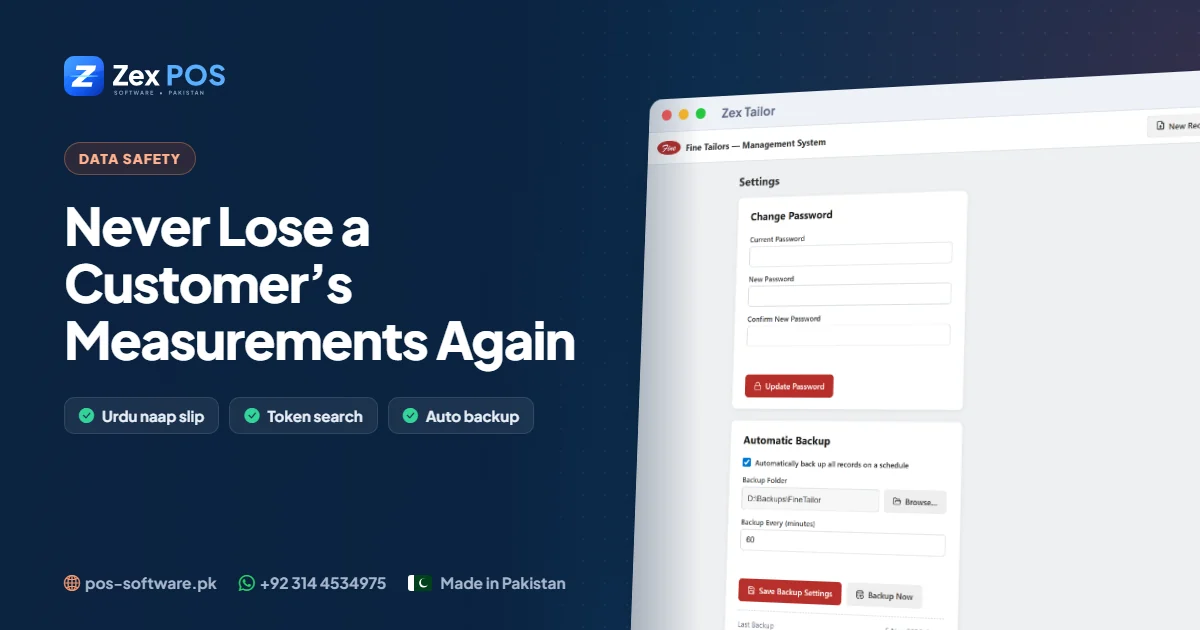
In Settings, turn on automatic backup, choose a backup folder and an interval. Zex Tailor then copies your records to that folder on schedule, with the date and time in each file name. It keeps a history of backups and automatically removes the very oldest once a large number have built up, so the drive doesn't fill up.
3. Back up now
Before a big change — a Windows update, moving the computer, or the start of the Eid season — press Back up now for an instant copy.
The settings screen shows when the last backup ran and any error, so you can see at a glance that it is working.
Where to put the backups
| Location | Protects against |
|---|---|
| Second hard disk or partition (e.g. D: or E:) | Software problems, accidental deletion |
| USB flash drive | Hard disk failure — take it home weekly |
| A second copy at home | Theft or fire at the shop |
The safest plan uses at least two: automatic backups to a second drive or USB, plus a weekly copy taken home.
A simple weekly routine
- Check the "last backup" time in Settings is recent.
- Copy the latest backup file to a USB drive.
- Take that USB home.
Five minutes a week protects years of work.
If the computer fails
- Install Zex Tailor on the new computer.
- Bring your most recent backup file from the USB or second drive.
- Contact us on WhatsApp and we'll help you restore the records.
Test your backup once
A backup you have never checked is a hope, not a plan. Once, after setting it up, open the backup folder and confirm new files are appearing at the interval you chose.
Read why tailor shops are going digital or ask us about backups on WhatsApp.
Waqas Ali
Waqas ALi
My name is Waqas ali im currently working as software developer in different Field